مقارنة بين TopTablePlanner و8 بدائل: أفضل برامج تخطيط الطاولات لحفلات الزفاف والمناسبات في عام 2026

The short version first. TopTablePlanner is still online in 2026, it still runs entirely in a browser with nothing to install, and it remains one of the cheapest ways to finish a wedding seating plan — for most events it costs less than the place cards you print from it. It is not the automatic default for every event, though. If you need 3D venue renders, ticketing or catering invoices, use another tool; if you want a dozen round tables, ninety-odd guests, a poster for the entrance and a per-table meal count for the kitchen, it does that job well. Prices here were checked in October 2026.
If you are arranging any function and you want everything perfect according to your requirements, the TopTablePlanner will be the best choice. It is the best table planner template maker that will help you to make a template beautifully for your birthday, wedding, or any other event. You can select or draw the table template with the help of this software in order to arrange any schedule for your wedding or any other events. In short, TopTablePlanner helps you to prepare a plan on your own wedding or any other event without asking for help from anyone else.
It suits one kind of job in particular: a couple or small organiser who wants a drag-and-drop plan they can open anywhere and finish tonight. TopTablePlanner is live and maintained, it has never become a desktop download despite directory listings claiming otherwise, and it is sold as a one-off payment rather than a subscription. Several of its rivals have changed hands: Social Tables was bought by Cvent in 2018, AllSeated rebranded as Prismm in January 2024 and then joined Cvent in April 2025, and The Knot retired its standalone seating chart page. The steps below cover how to choose a tool and where TopTablePlanner earns its place.
Step 1: Compare the Table Plan Software Before You Commit
Choosing badly hurts because most table planners are either far too big or far too small for one wedding. Three questions settle it before you touch a card: does it print what the venue wants, can it import a guest list rather than make you type one, and will more than one person ever edit it? Here is how the credible 2026 options compare.
| Tool | Platform | Free tier / trial | Price (October 2026) | Export / output | Best for |
|---|---|---|---|---|---|
| TopTablePlanner | Browser app: Chrome, Safari, Edge and Firefox on PC, Mac, tablets and phones; nothing to install | Free, fully functional trial, no signup | One-off: £10 Personal for 6 months (5 plans), £15 Personal Plus for 12 months (5 plans), £40 Professional for 12 months (20 plans, business use); payable in GBP, USD, EUR, CAD or AUD | PDF plan, guest list, place cards, escort cards, meal summaries; CSV data; print A4/Letter to A1 | One wedding or dinner you want finished tonight |
| PerfectTablePlan | Desktop installer for Windows 11/10 and macOS; works offline | Try indefinitely, but plans over 30 guests need a licence key to save, print or export | One-off per user: $29.95 Home, $74.95 Advanced, $299.95 Professional; install on up to 5 machines | Printed charts, place cards and badges; exports to Word and Excel | Anyone who wants to own the software outright |
| Planning Pod | Web app | 14-day free trial, no free plan | Event management from $74/mo (10 events) to $159/mo (50); Venue Management $149/mo; floor-plan-only plans start lower | Full-colour PDF floor plans and seating charts, plus scalable vector output | Professionals who also need CRM, contracts, BEOs and invoicing |
| Cvent Event Diagramming (formerly Social Tables) | Web | Free Essential tier: 1 user, 1 event a year, 5 diagrams | Professional listed at $199/mo on a 12-month commitment; older tiers showed $49, $150 and $320/mo | Diagrams, seating charts, 3D renders, post-event reporting | Venues and hotels already inside the Cvent ecosystem |
| Prismm (formerly AllSeated) | Web, 2D plus photorealistic 3D | No self-serve free tier for couples | Quote-based enterprise pricing since the acquisition | 3D walkthroughs, layouts, client-facing sharing | Large or awkward venues needing true 3D |
| The Knot / WeddingWire guest list managers | Web and mobile | Free with an account, no guest cap | Free | Guest list CSV export; table and meal notes rather than a scaled floor plan | Couples already collecting RSVPs there |
| Canva | Browser, Windows, macOS, iOS, Android | Free tier | Canva Pro $15/mo | PDF and print output; design only, no guest data | Making the display chart look good |
| Google Sheets / Microsoft Excel | Browser and desktop | Free with a Google account | Free | Whatever you build; CSV and XLSX round-trip into a dedicated tool | Zero budget and patience for manual work |
| Event Temple | Web | Free trial, no free plan | From $249/mo | Proposals, contracts, banquet event orders, reports | Venues needing sales, room blocks and BEOs |
Reading that table by failure mode beats reading it by feature count. Every option handles twelve tables and a hundred guests; they differ the week someone cancels, or when the caterer wants vegetarian counts broken down by table.
| If this describes you | Pick | Why |
|---|---|---|
| One wedding or party, under roughly 150 guests | TopTablePlanner | Cheap, quick, prints everything the venue asks for |
| You want to own the software and work with no internet | PerfectTablePlan | One-time licence, installs on your own machine |
| You plan dozens of events a year and invoice clients | Planning Pod | Floor plan sits inside the business tooling you already need |
| You sell your venue to corporate clients | Cvent Event Diagramming or Prismm inside Cvent | 3D walkthroughs close rooms faster than a flat plan |
| Your whole wedding already lives on The Knot or WeddingWire | Keep the guest list there, export CSV, seat in a dedicated tool | Keeps RSVP collection and the printed plan from drifting apart |
| There is no budget at all | Google Sheets, then Canva for the display sign | Zero cost, total control, more manual work |
Step 2: Check What TopTablePlanner Actually Does in 2026
TopTablePlanner launched in the UK and is still run from there. It is a browser product through and through, described by the vendor as working from a laptop, tablet or phone with no app to install and no updates to worry about. That matters because directories still list Windows, Mac, Linux, iPhone, iPad and Android builds and even claim native mobile apps exist. They do not: there is no installer and no desktop build to maintain, which is why the tool behaves identically on a MacBook and a borrowed Chromebook.
What Makes TopTablePlanner the Best Software for Wedding and Events?
The TopTablePlanner brings a lot of amazing and useful features which make this app the best option for all those who want to organize their special days without any hassle. So, have a look at some of the best points of this popular app!
Access is sold as a one-off payment rather than a subscription: £10 buys six months on Personal, £15 buys twelve months on Personal Plus, and £40 buys a twelve-month Professional licence permitting business use, lifting the saved-plan cap from five to twenty and adding priority support. Payment runs through PayPal or card in pounds, dollars, euros, Canadian or Australian dollars, and nothing renews automatically. Prices are set in pounds, so the equivalent dollar, euro, Canadian or Australian figure moves with the exchange rate.
Step 3: Save Time
You don’t have to visit any person for planning your event or wedding because the table plans software will help you to perform all this work without creating any mess. This will save you time and money at the same time.
The saving comes from one thing: dragging names onto tables instead of rewriting place cards every time someone changes their mind. Seats can be rearranged as often as you like and every version stays printable. One honest limit — TopTablePlanner does not pull RSVPs from a wedding website the way big planning suites do. You type guests in or import them from Word or Excel, and maintain meal choices yourself. Manual once, rather than manual every time a guest replies.
Step 4: Access from Anywhere
You can access this software from anywhere in the world and you don’t have to sit at a specific place to handle this. You can operate this from any browser and device. If you want to arrange the seating plan for your wedding, the wedding seating chart maker will help you to perform this task in the easiest way. You will select the table template and the number of guests and then the table arrangement by arranging guests.
The supported browsers are Chrome, Safari, Edge and Firefox, on PCs, Macs, tablets and smartphones, with nothing to download. Because the plan lives in the browser it genuinely travels — you can finalise tables during the venue walkthrough and print that evening. It is responsive web access rather than a native app, so expect no offline editing.
Step 5: Plan Sharing
You can share your wedding plan with all the decided things, like meal plans or different arrangements from a different location as well and you will share the seating plans and sitting details as well. Without worrying about the venue and other arrangements, plan your wedding with table plan software online.
Sharing works two ways: your partner, venue or parents can log in from another location and see the same plan, and you can email a PDF of the finished arrangement to the venue and your suppliers. It also produces meal choice totals and RSVP numbers, which is what caterers actually care about. The caveat is depth — this is a plan several people can log into, not a real-time co-editing document, and dedicated diagramming suites handle collaboration in more depth. For one wedding it is plenty.
Step 6: Add Table Details
You can prepare a DIY wedding seating chart, without any hassle and tension. You can add the table details and design and the number of chairs you want on one table, and then prepare a list about it.
In practice this covers more than tables. You choose round, square or rectangular tables, set the seats per table, name each table, and drag the whole floor plan around until it works. Cake tables, gift tables and dance floors can be added so the printed diagram matches the room, and rows of seats can be drawn for ceremony seating as well as the reception.
Step 7: Print Table Plan
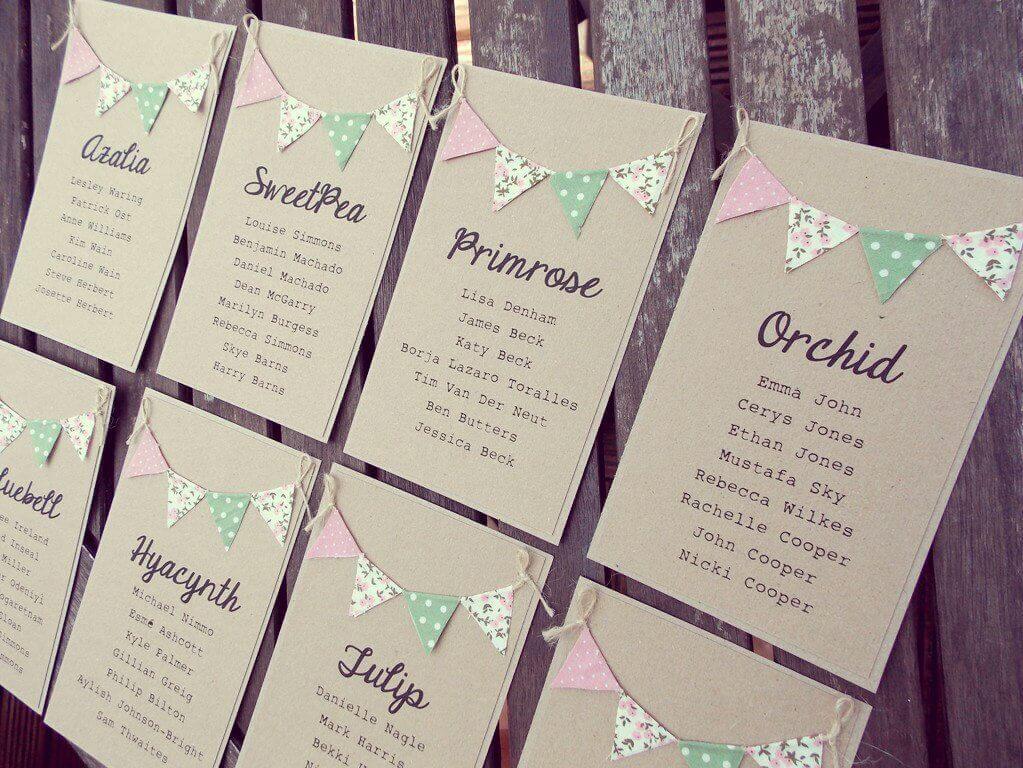
After selecting all the table details, then take a print of the selected plan. While printing the selected table, you can select the font size from the software. You can print this on the simple card or printable card.
The font control goes well beyond a size picker: you pick from a list of script, serif and sans-serif faces, set a title and subtitle, and choose whether to print table outlines, seat outlines and colours. Output runs from A4 or Letter up to A1 poster size, so one plan can serve the kitchen and the easel. The print module also produces matching place cards and escort cards.
Step 8: Export Exactly What the Venue and Caterer Ask For
Printing is rarely the last step. Venues usually want three documents: the seating chart for the easel, the guest list sorted by table for staff, and the meal breakdown by dish for the kitchen. TopTablePlanner produces all three as PDFs — table plan, place cards, escort cards, guest list by table, meal summaries and full guest list — and can dump the plan data as CSV, the format nearly every other tool accepts. Only plan count, business use and support priority sit behind the Professional licence.
الأسئلة الشائعة
1. Is TopTablePlanner still available in 2026?
Yes. It runs at its long-standing UK-owned address and is kept up to date — not discontinued, acquired or absorbed into another platform, which is what happened to several of its former rivals.
2. Do I need to download or install anything to use it?
No. It runs in Chrome, Safari, Edge and Firefox on Windows PCs, Macs, tablets and phones. Directory listings advertising Windows, Linux, iPhone or Android installers are wrong.
3. How much does TopTablePlanner cost now?
Three one-off tiers: £10 for six months of Personal access, £15 for twelve months of Personal Plus, £40 for a twelve-month Professional licence. All include unlimited edits, guests and tables plus email support; they differ in plan count and whether business use is allowed.
4. What happened to the 7-day risk-free trial?
There are two of them. A free trial needs no signup, so you can test the tool with your real guest list before paying anything; the 7-day money-back guarantee applies once you have bought a licence. Neither one limits how long you can keep using the plan you built.
5. Can I import my existing guest list?
Yes. Names import from Word or Excel files, or can be typed in. Afterwards you can track RSVPs, meal choices and special requirements per guest, and mark guest types such as adult, child, infant and VIP.
6. What happened to AllSeated and Social Tables?
AllSeated rebranded as Prismm in January 2024 and Cvent acquired Prismm in April 2025. Social Tables was acquired by Cvent in October 2018 and is now sold as Cvent Event Diagramming. None is a free DIY option for couples any more.
7. Does TopTablePlanner automatically read RSVPs from my wedding website?
No. It is a standalone seating tool, so guest details come from what you type or import. Couples who want automatic RSVP flow usually collect replies on a Knot or WeddingWire list, export CSV, then seat everyone in a dedicated tool.
8. What is the best free table plan software?
For the plan itself, Google Sheets costs nothing and handles small guest counts well. The Knot and WeddingWire guest list managers are free with an account, though The Knot retired its standalone seating chart page, so seating now lives inside the guest list manager. Canva’s free tier then handles how the chart looks.
خاتمة
Well, after knowing all the above beneficial features of the TopTablePlanner software, you can confidently say that you can arrange a number of things for your wedding on your own with the help of this software. It will save both time and money because you can operate this from your cell phone or PC. You don’t have to download an application for this software because it works online.
Working on this software is quite easy. All you need to do is to select your detail and email it to your Venue, suppliers, or the designated persons. Here is a 7 days risk-free trial version and if you don’t like using it or you don’t find this software helpful, your money will be returned but it only works for 7 days when you buy this software.
For all your queries, the customer service team is always available to resolve all issues because they do care about their customers.
Browser-only access covers tablets as well as phones and PCs, and it is the reason the tool behaves the same wherever you open it. Buying it is a one-off payment rather than a subscription: the money-back window applies after you buy, and it is separate from the free trial, which needs no signup or card. Free email support comes with every tier, with priority support on Professional. The field around it is crowded now — 3D venue twins, suites that invoice your clients, and directories that hold your RSVPs — and TopTablePlanner wins the narrow job it was built for: turning a guest list into a printed plan in an evening for £10 to £40. If you outgrow it, export the CSV and move on.
ما مدى فائدة هذا المنشور؟
انقر على نجمة لتقييمه!
متوسط التقييم / 5. عدد الأصوات: