High audio quality is a controversial term. Some may say it’s only noticeable with some high-end devices listening to it. Others may claim it does enhance the vibe and feel of the music you are listening to.
If you’re a Spotify user, you might be wondering, what is the best Spotify streaming quality ? Is the Spotify premium audio quality better than the free tier? What audio quality can a Spotify ripper extract? Let’s find out all the answers together.
Part 1. What is High-Quality Streaming on Spotify?
Spotify offers its music on three different levels. A low-quality streaming option of up to 128 kbps, 256 kbps high setting with moderate audio quality, and a 320 kbps very high quality the latter is what we know as very high-quality streaming on Spotify. However, most media consumption is 256 kbps because Spotify uses it to save data and offline downloads.
![How to Get Best Spotify Streaming Quality [2022 Guide]](https://www.getappsolution.com/images/20220210_620555b48a5f0.png)
Spotify only allows its premium users to access very high-quality music. Most of the time, premium users don’t recognize the high-quality Spotify streaming and keep playing the regular 128 kbps playback. You indeed need a compatible device or headset to experience the depth of the audio. But any keen ear can feel the jump from 256 kbps to 320 kbps.
Tips for Spotify High-Quality Streaming
1. Ensure a good connection
By default, the streaming settings are set to automatic depending upon the strength of the connection. A good Wi-Fi connection means it will keep on streaming in high quality.
2. Enable high streaming over data
Για να εξοικονομήσει δεδομένα, το Spotify μειώνει την ποιότητα ροής της μουσικής σας. Μπορείτε να την αλλάξετε στις ρυθμίσεις στον πίνακα ποιότητας ήχου.
3. Use the Spotify application
Spotify web browser will reluctantly lower the audio quality to only 160 kbps. So make sure to stream only from the Spotify application.
If you want the absolute best quality, then using a Spotify premium account may help. You can unlock ‘Very high’ streaming quality up to 320 kbps.
Μέρος 2. Πώς να βελτιώσετε την ποιότητα ροής του Spotify σε υπολογιστή
This topic is controversial because people don’t consider the factors that affect Spotify streaming quality. You need more than a suitable output device to enjoy the thrill. Spotify allows its users to set the Spotify streaming quality to “high” for free users or very high for premium users. It will only play in that resolution once the audio quality is locked to 256 kbps or 320 kbps, respectively. Here is how to improve Spotify streaming quality on PC.
Βήμα 1: Open Spotify. Click on the drop-down menu from the top right.
![How to Get Best Spotify Streaming Quality [2022 Guide]](https://www.getappsolution.com/images/20220210_620555b52e223.png)
Βήμα 2: Open the Settings menu. Under Music Quality , set streaming quality to high for free users or very high for premium users.
![How to Get Best Spotify Streaming Quality [2022 Guide]](https://www.getappsolution.com/images/20220210_620555b5aac36.png)
Part 3. Improve Spotify Premium Audio Quality on Mobile
Smartphones are the hub of media consumption, either listening while driving or enjoying casually. Most of the users don’t know they can even enhance their experience through high-quality music. Here is how to improve Spotify’s premium audio quality on mobile.
![How to Get Best Spotify Streaming Quality [2022 Guide]](https://www.getappsolution.com/images/20220210_620555b64b296.png)
Βήμα 1: Open Spotify. Tap on settings from the top right corner of your home screen.
Βήμα 2: Κάντε κύλιση προς τα κάτω στο Ποιότητα ήχου . Click on Υψηλή ποιότητα ή Πολύ υψηλή ποιότητα for premium users.
Part 4. Get the Best Spotify Sound Quality on The Web Player
Πρέπει να αποδοθούν τα εύσημα εκεί που τους αξίζει. Και αυτή τη φορά, αξίζουν τα εύσημα για την φανταστική δουλειά του Spotify που έκανε το οικοσύστημα συνεκτικό. Το πρόγραμμα αναπαραγωγής ιστού και η εφαρμογή σε όλα τα λειτουργικά συστήματα λειτουργούν με παρόμοιο τρόπο, καθιστώντας το εξαιρετικά εύκολο στη λειτουργία. Ο ενεργός συγχρονισμός κομματιών και λήψεων εκτός σύνδεσης το καθιστά εξαιρετικά βολικό και αυτός είναι πιθανώς ο λόγος για τον οποίο το Spotify έχει 165 εκατομμύρια χρήστες επί πληρωμή. Αλλά υπάρχει ακόμα ένα πολύ κολοσσιαίο μειονέκτημα.
![How to Get Best Spotify Streaming Quality [2022 Guide]](https://www.getappsolution.com/images/20220210_620555b6ca81f.png)
It’s that the Spotify web version doesn’t offer the option for setting streaming quality manually. The best quality Spotify web version offers 160 kbps. That’s the reason there is no settings menu under the drop-down menu for the Spotify web version.
Part 5. How to Download Spotify Music at the Best Streaming Quality
Audio or content loss is the worst nightmare any content user can ever have. Imagine downloading songs from Spotify, and it downloads in low quality due to various situations we have discussed above. Many people don’t like to download songs on Spotify. Instead, they use tools that can extract Spotify music into local drives. The result is often not so fantastic; it’s a lose-lose for everyone.
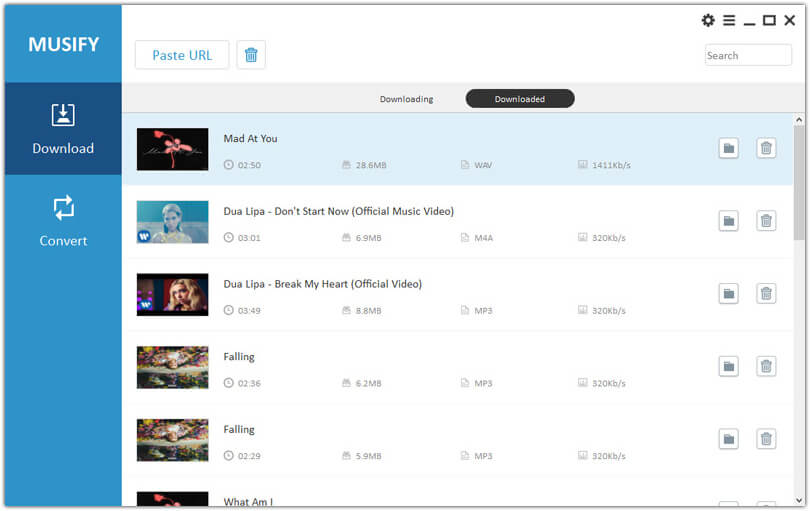
Let us save your day with Μετατροπέας μουσικής Spotify . It’s a premium tool that can replicate the same Spotify streaming quality. The audio quality is similar, but it also lets you save all music into local storage. So that means you have complete control over the music. Sharing, editing, or enhancing the audio to your liking is easy. Let us enlighten you with the features of the Spotify Music Converter.
- Exact music with premium Spotify sound quality
- Πολλές μορφές ήχου που πρέπει να λάβετε υπόψη, όπως MP3, M4A, FLAC, WAV και άλλα
- Original metadata information
- Δεν υπάρχει προστασία DRM (διαχείριση ψηφιακών δικαιωμάτων)
- Δεν χρειάζεται premium λογαριασμός Spotify για να κατεβάσετε μουσική από το Spotify
Είστε έτοιμοι να κατεβάσετε μουσική από το Spotify σε ρυθμίσεις υψηλής ποιότητας; Ορίστε how to convert Spotify to MP3 via Spotify Music Converter in a few simple steps. First, make sure you have the latest versions of the Spotify Music Converter for Mac and Windows.
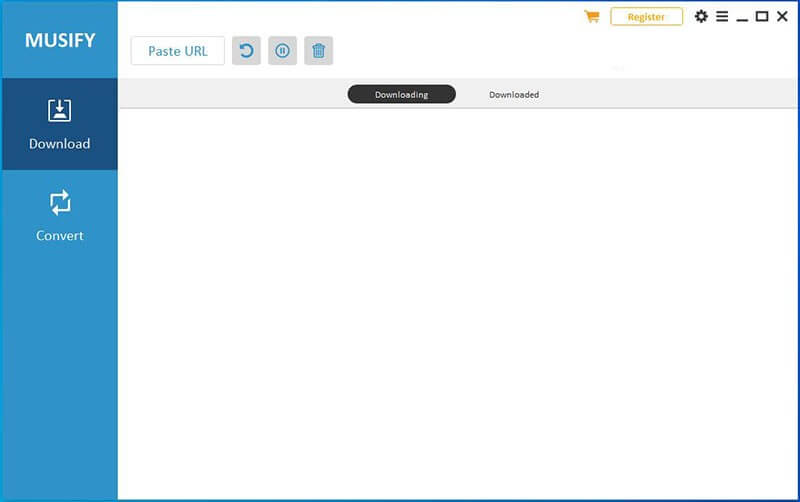
Βήμα 1: Αποθέστε τον σύνδεσμο προς το τραγούδι που θέλετε να κατεβάσετε. Μπορεί να είναι από το Spotify web player ή από τη δωρεάν έκδοση του Spotify. Επικολλήστε τον στη γραμμή URL στο Spotify Music Converter. .
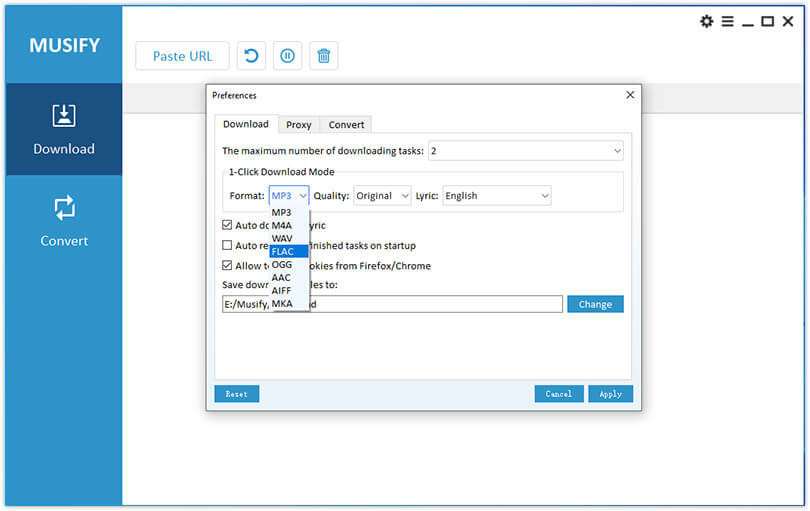
Βήμα 2: The next step is to customize your song according to your taste. Change the output formats for your music from the top right corner. Storage locations are also customizable. Click on the Browse option on the lower left and save your desired location.
Βήμα 3: Once done with the preferences for download. Click on the convert at the lower right-hand side of your screen. The whole process will start happening right in front of you.
Σύναψη
Either you are a heavy media user or a regular consumer. Music is what you need to vibe and connect to your soul. Shallow notes and low-quality music easily distort such a delicate connection. We have put a detailed guide for those of you who don’t know about the high-quality streaming settings on Spotify. You can learn everything from understanding what high-quality streaming is to how you can access it, the possible reasons for low music quality, and the best alternative high-quality music.
If you’re keen on the best streaming quality of Spotify but don’t want to purchase a premium account, you can use Μετατροπέας μουσικής Spotify as the Spotify downloader. In this way, you can keep unlimited Spotify music and playlists as local MP3 files in Spotify premium audio quality.
Πόσο χρήσιμη ήταν αυτή η ανάρτηση;
Κάντε κλικ σε ένα αστέρι για να το αξιολογήσετε!
Μέση βαθμολογία / 5. Καταμέτρηση ψήφων: