Before we dive straight into How to perform Deleted TXT File Recovery In Windows? You might be facing the problem of recovery of deleted or unsaved .txt files of Notepad/Notepad++ in Windows.
Let us get a brief idea about the .txt files. So, stick around!
What is a .txt file?
A .txt file can contain text with no special formatting such as bold text, italic text, images, etc. And are commonly used for the storage of information.
You can easily create and open a .txt file using Microsoft Notepad and Apple TextEdit. These files are commonly used for recording notes, directions, and other similar documents.
You might have encountered some problems related to .txt files such as:
“ Ik had een tekstbestand waarin ik al mijn belangrijke links en notities met betrekking tot mijn andere accounts en wachtwoorden bewaarde. Tijdens het werken crashte het programma plotseling. Toen ik het probeerde te heropenen, bleek het leeg te zijn. Nu ben ik al mijn belangrijke gegevens in het .txt-bestand kwijt.
So, let us discuss the methods to retrieve lost .txt files easily.
Methoden om verwijderde TXT-bestanden te herstellen in Windows:
Some of the methods that you can use to recover deleted .txt files are :
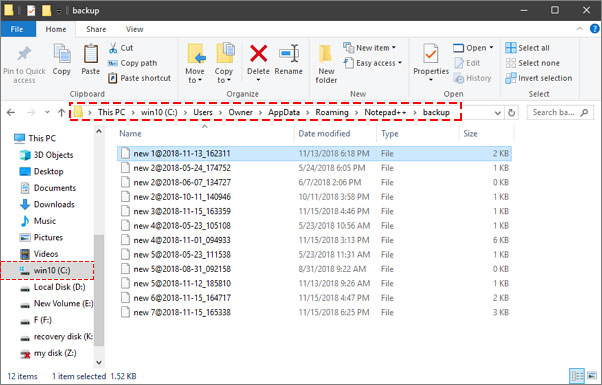
Method 1. Recovery from temp files or asd files
When the .txt files are deleted from the computer, the contents are not erased from the system. The text file name is removed along with the information that points to the location of the file. That is why the program is unable to locate it.
Je kunt dus de onderstaande stappen volgen om verwijderde .txt-bestanden te herstellen via tijdelijke bestanden.
- Ga naar de Start Menu .
- Now type %AppData% in de Zoekbalk voor bestanden of mappen named box.
- PressEnter to direct to C:UsersUSERNAMEAppDataRoaming.
- Typ vervolgens de naam van uw verwijderde tekstbestand, of de extensie .asd of .tmp, in de zoekbalk aan de rechterkant.
- Zoek het verwijderde .txt-bestand dat u zoekt op basis van de wijzigingsdatum.
- Now copy this file to the desktop.
- Change the filename extension from .asd or .tmp to .txt.
If you are unable to do Deleted TXT File Recovery by using this method, you can try the next method.
Methode 2. Herstellen vanuit eerdere versies
Windows has a built-in tool that automatically saves old versions of your data files. For this, the system protection should be turned on. So, if the system protection is turned off, you can turn it on by following the steps given below:
- Goto Bedieningspaneel > Systeem en beveiliging > Systeem
- Onder Control Panel Home, Klik op Systeembeveiliging
- Selecteer de Drive and click on Configure .
- In the new window, mark Systeeminstellingen en eerdere versies van bestanden herstellen en klik Ok .
Now, for restoring the older versions of text files, follow the steps given below:
- Find the folder containing the deleted .txt file
- Now right-click the file and select Restore Previous Version . A list of available previous versions of the .txt file will be displayed
- Je kunt klikken Open to view it to make sure it’s the version you want as a recovered .txt file
- Finally, click on Herstellen .
Method 3. Recover from Windows Backup
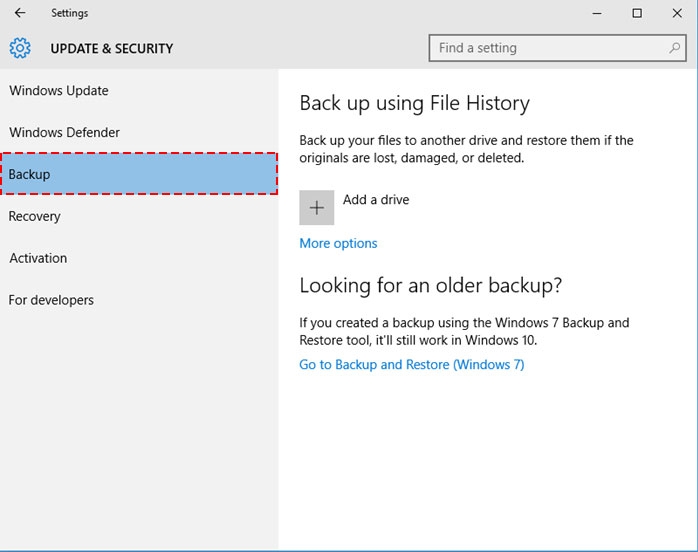
For Windows users, you can use the File History option to retrieve deleted or lost .txt files. The steps are fairly simple.
- Sluit de gewenste herstelschijf aan en klik op de knop 'Start'.
- Click on the Settings option
- Select Update & Security > Backup > More options
- Click Restore files from a current backup and restore the most recent backup which holds your lost file.
Methode 4. Met behulp van een gegevenshersteltool.
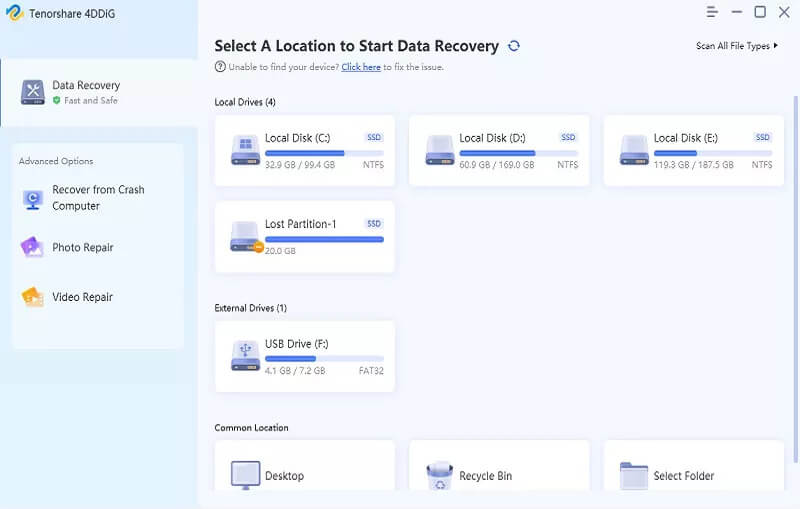
You can use the Professional Data Recovery Tool to perform deleted TXT file recovery on Windows. It is a great tool to save precious time.
Gratis downloaden Gratis downloaden
Conclusie
In dit blogbericht heb ik een aantal methoden besproken om zelf verwijderde TXT-bestanden op Windows te herstellen. Sommige methoden zijn handmatig. Maar als het je niet lukt om de verloren .txt-bestanden op deze manier terug te vinden, kun je de Data Recovery-tool downloaden om de klus te klaren.
Gratis downloaden Gratis downloaden
Hoe nuttig vond u dit bericht?
Klik op een ster om een beoordeling te geven!
Gemiddelde beoordeling / 5. Stemmentelling: