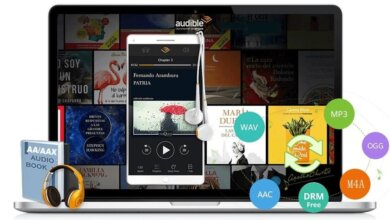
Deux méthodes populaires pour lire des fichiers Audible AAX et AA sur Android

Android mobiles and tablets are widely used among users, and many of them are also carrying Android devices for music and audiobook enjoyment. Actually, Android devices can not natively support playing Audible AAX/AA files due to Audible DRM protection. If you plan to use your Android device for Audible AAX/AA enjoyment but have no idea where to start it you come to the right place. The following will provide two popular methods to help you enjoy Audible AAX/AA audiobooks on Android devices.
Method 1: Install the Audible app on an Android Device
Audible has launched an App for Android devices, and you can go to the Google Play Store to download and install the Audible app on your Android device. Open the Audible app on your Android device and sign in>Tap the menu button>Click on the Library button> click Titles, and then click All category, where you can check what Audible audiobooks are available for you to enjoy. If you want to download some Audible audiobooks for offline playback on your Android device, you can tap on the cover art of the audiobook you like to download, after that you can enjoy the Audible AAX/AA files on your Android device, but remember, the Audible AAX/AA files must be played via the Audible app on your Android device. Can we play Audible AAX/AA files on Android devices without the Audible app? Of course, you can follow Method 2 to do that.
Method 2: Install Audible Converter
Звучни конвертор is designed as a professional Audible AAX/AA to Android converter to convert any Audible AAX/AA file to any Android device’s best-supported MP3 file without DRM protection. This Audible Converter can fulfill the following tasks completely:
- Convert any Audible AAX/AA file to Android MP3 without DRM protection and without quality loss.
- Provide up to 60X faster conversion speed to convert Audible AAX/AA to Android MP3.
- Keep the metadata of audiobooks and work on any system of Windows or Mac.
- Support to split audible into chapters.
How to Convert AAX/AA to Android-Supported Format?
You can check the following steps to convert your Audible AAX/AA file to your Android device-supported MP3. Free download Audible AAX/AA to Android Converter.
Téléchargement gratuit Téléchargement gratuit
Step 1. Add an Audible AAX/AA file to Audible Converter
Two methods are supported to import Audible AAX/AA files to this Audible AAX/AA to Android Converter: Click the “+add” button or use the drag-and-drop feature.
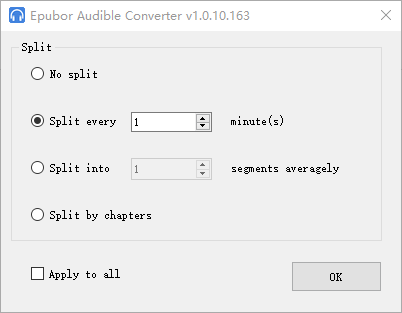
If you want to split your audiobooks into chapters, you can click the “Split by chapter” button and click the “OK” button to finish it. Or you can further click the “Apply to All” button to apply this feature to all the imported audiobooks.

Step 2. Split AA/AAX to MP3 with chapters
This Audible Converter also has a function to split audiobooks into chapters. You can select the “split by chapters”>”OK” button to split audiobooks into chapters. You can also check the “Apply to all” button to allow splitting audiobooks into chapters for all future imported Audible AA or AAX files.
Step 3. Convert Audible AAX/AA file to Android MP3 without DRM protection
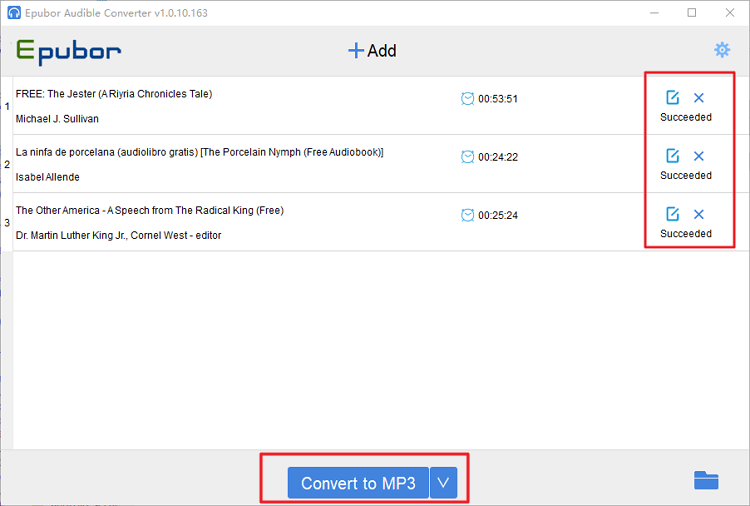
Click on the “Convert to MP3” button at the bottom to start the conversion. This conversion will remove the Audible AAX/AA DRM protection and also help to convert it to an Android device-supported MP3 format after the conversion is done.
Téléchargement gratuit Téléchargement gratuit
Ce message vous a-t-il été utile ?
Cliquez sur une étoile pour donner votre avis !
Note moyenne / 5. Dénombrement des votes :