
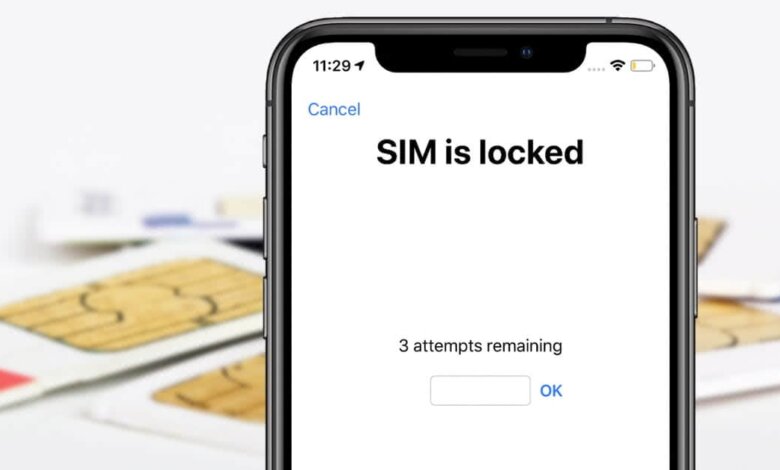
The SIM lock helps prevent anyone from accessing your cellular data. It’s a great security feature that utilizes a SIM PIN to lock the SIM card. Every time you reboot your iPhone, remove the SIM card, or switch the service carrier, you’ll need to enter the PIN to unlock the SIM card. So, if you forget your SIM PIN or buy an iPhone that’s SIM card-locked, you’ll definitely get locked out of the SIM card and your phone, too, which can be quite maddening.
The good thing, though, is that there are several methods that can help you unlock the locked SIM card. Hence, don’t worry if you’re facing such a situation. Here in this guide, we’ll show you how to unlock a SIM card on an iPhone using various simple procedures. You won’t need any special equipment to do so. But first, let’s look at why iPhone usually say SIM locked.

Part 1. Why does iPhone say SIM is locked?
El iPhone suele indicar que la tarjeta SIM está bloqueada cuando se ha configurado un PIN. Al activar el bloqueo de la tarjeta SIM, aparecerá una pantalla que dice "Tarjeta SIM bloqueada" cada vez que la extraigas o cambies de operador. Usar un PIN para bloquear la tarjeta SIM de esta manera ayuda a proteger tus datos móviles.
You can still turn the SIM PIN off, though in case you find that it bothers you. You just head to Ajustes , toque el Cellular opción y luego tocar SIM PIN A continuación, introduce el PIN de la tarjeta SIM que configuraste para desactivarla. Si introduces el PIN incorrecto cuatro veces, el iPhone te pedirá un código PUK, también conocido como clave de desbloqueo del PIN; solo puedes obtenerlo contactando con tu operador.
A veces, un iPhone indica que la tarjeta SIM está bloqueada porque has introducido el PIN incorrecto demasiadas veces. En este caso, la tarjeta SIM se bloqueará permanentemente. También puedes comprar un iPhone de segunda mano con la tarjeta SIM bloqueada, por lo que también mostrará el mensaje "Tarjeta SIM bloqueada". Sea cual sea tu situación, aquí te explicamos cómo desbloquear una tarjeta SIM sin el código PUK en tu iPhone.
Parte 2. Cómo desbloquear tu tarjeta SIM en iPhone
Desbloquea la tarjeta SIM del iPhone a través de la aplicación del teléfono.
Si el mensaje "La tarjeta SIM está bloqueada" ha desaparecido, la mejor y más sencilla manera de recuperarlo para poder desbloquear la tarjeta SIM y el iPhone es abrir la aplicación Teléfono y realizar una llamada a uno de tus contactos o a cualquier número.
It can be any random contact. The dialog will show up, thereby allowing you to put in the SIM PIN. You don’t even need to call a genuine number. You can call a bogus number like “333” and tap the green button.
Desbloquea la tarjeta SIM a través de la configuración del iPhone.
If you’re looking for another way to unlock a SIM card without a PUK code on an iPhone, then this is it. Disabling your SIM PIN is one easy method that can help you unlock your SIM card. You’ll get asked to provide your SIM PIN during the process, so you should enter it in case you remember it. Don’t try to guess it, though, if you’re not certain that it’s the right SIM PIN. If you’re sure you want to proceed, then just enter the default SIM PIN found on the customer service page or the service document. From there, unlock your SIM card on your iPhone through Settings by following these steps.
- Lanzamiento Ajustes en tu iPhone.
- Toca el Teléfono opción. A continuación, pulse “ SIM PIN ”.
- Now turn the SIM PIN off.
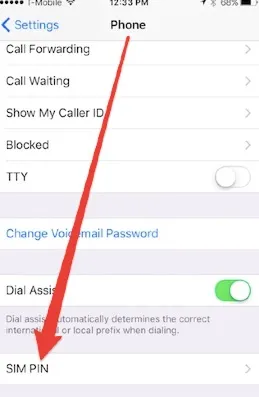
Consejo: You can change the old SIM PIN on your iPhone so that next time you can use a new SIM PIN code to unlock the SIM card.
Parte 3. Desbloquea un iPhone bloqueado con iPhone Unlocker.
Desbloqueador de iPhone Es una herramienta increíblemente práctica para desbloquear un iPhone bloqueado por cualquier tipo de bloqueo de pantalla. Es capaz de eliminar eficazmente diversos tipos de bloqueos de pantalla. Así que, no importa qué tipo de bloqueo de pantalla quieras desbloquear, porque este programa te ayudará a recuperar el acceso a tu dispositivo bloqueado por tarjeta SIM con un solo clic.
Descarga gratuita Descarga gratuita
Moreover, the tool is able to remove iPhone passcodes without ending up stuck in the iCloud activation lock screen. The best part is that it unlocks your device without causing data loss. Besides that, iPhone Unlocker can work with all iOS versions and nearly all iPhone models. So, download it and install it onto your computer to use it.

Part 4. FAQs About SIM Cards on iPhone
P1. ¿Puedo simplemente cambiar la tarjeta SIM de mi iPhone?
A lot of people have been asking if they can just swap SIM cards on an iPhone. Well, the answer is an absolute yes. You can indeed swap SIM cards on iPhones. Can I Just Swap SIM Cards on my iPhone?
P2. ¿Puedo eliminar el bloqueo de SIM de mi iPhone?
Yes, you can really remove the SIM lock from your iPhone. However, the instruction or procedure to do it differs depending on the carrier and the phone model. In general, though, you can reach out to your carrier and they can help you get rid of the SIM lock.
P3. ¿Cómo puedo transferir mi tarjeta SIM actual a un nuevo iPhone?
Dirígete a tu nuevo iPhone y abre la app Ajustes. Abre la opción Datos móviles y luego toca Configurar datos móviles o Añadir eSIM. A continuación, toca la opción Transferir desde un iPhone cercano o selecciona un número de teléfono. Ahora ve a tu antiguo iPhone y confirma la transferencia siguiendo las instrucciones.
Conclusión
Si quieres saber cómo desbloquear una tarjeta SIM bloqueada en un iPhone, puedes explorar los métodos que hemos compartido anteriormente. Todas son soluciones viables que pueden ayudarte a superar el bloqueo de la tarjeta SIM y acceder a tu iPhone.
Descarga gratuita Descarga gratuita
¿Qué tan útil fue esta publicación?
¡Haz clic en una estrella para valorarlo!
Calificación promedio / 5. Recuento de votos:


