Резюме: CSV (formerly known as Comma-separated values) is the most popular file format to store crucial information. It is the go-to format for many scientific and business operations. Plus, CSV is compatible with almost all existing applications. Thus, these advanced and easy edit options of CSV files insist users convert PST to CSV format. In this post, we will discuss the most effective solution to convert PST to CSV without Outlook installation.
Безплатно изтегляне Безплатно изтегляне
Before knowing the technique of .pst to .csv converter free download, Let us understand the Outlook PST and CSV format.
What is Outlook PST?
Outlook PST (Personal Folders file) is an Outlook data file used to store local copies of mailbox emails, calendar events, and other items from your Exchange mailbox. Its appearance is closely related to Outlook version 2003, and it can store all of your Outlook folders, including the Inbox, Calendar, and Contacts.
What is a CSV File?
A CSV (comma-separated values) file is a plain text file that contains a list of data. It supports different programs to exchange data and may mostly encounter spreadsheets and databases. It is in a wide variety of programs, including any apps that work with plain text like the Notepad app; the thing that makes a CSV file unique is inbuilt features to organize the data in rows and columns.
Why use a CSV File?
- CSV is used to transfer and export the data from one app to another.
- The platform-independent features allow users to use the CSV file on any operating system like Windows, Mac, and Linux.
- Support a wide range of applications such as excel, office, google sheets, LibreOffice, GenScriber, OpenOffice Calc, FreshBooks, Mobi systems OfficeSuite, etc.
- You can also import a CSV file into the database.
- CSV Files is a plain-text format that means human-readable.
- The parsing CSV file is easy to implement.
- It is easiest to generate the CSV file.
- CSV is the most reliable format to share a large amount of data.
Как да конвертирате PST в CSV без Outlook?
There is no manual method to convert Outlook PST to CSV without installing Outlook apps. But by using the PST конвертор , you can easily convert your Outlook PST files into CSV file format. The software is competent enough and recommended by many MVPs worldwide for exporting the PST mailbox data into a CSV file format.
The tool runs on both Windows and macOS:
Безплатно изтегляне Безплатно изтегляне
Free PST to CSV Converter Working Steps
Стъпка 1. Изтегляне и run на Инструмент за конвертиране на PST файлове as an administrator.
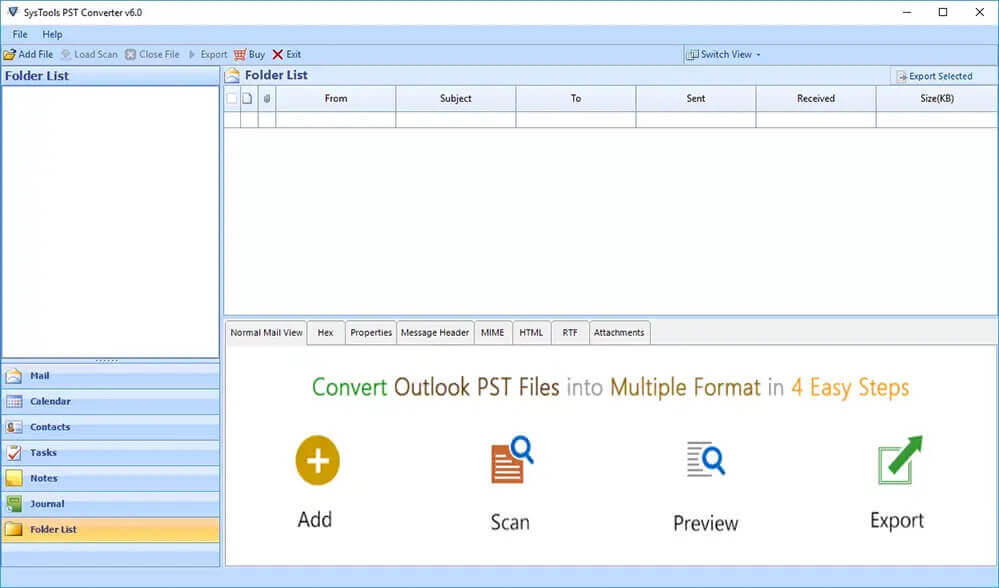
Стъпка 2. Изберете на Single File or Multiple Files/Folder option s to add a CSV file.
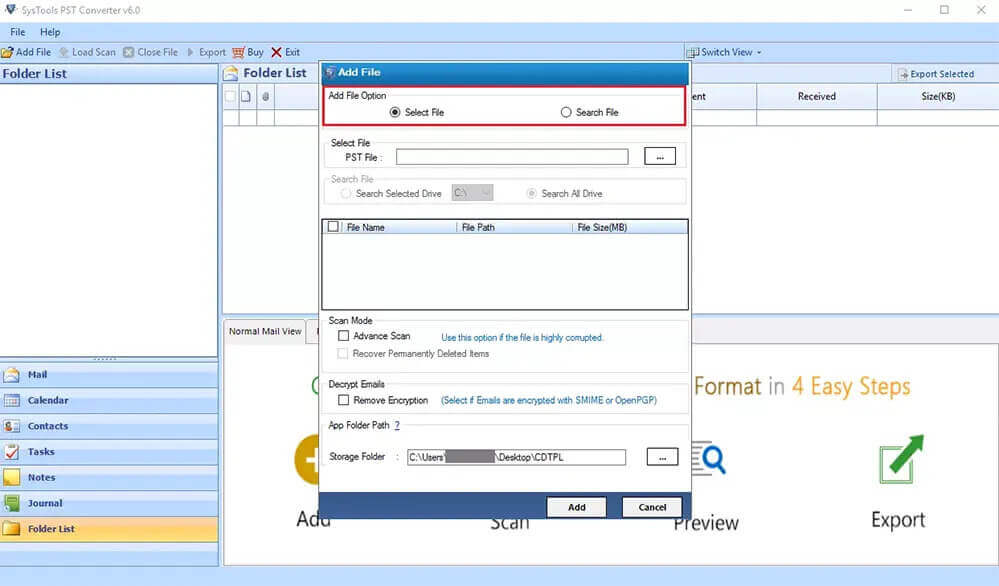
Стъпка 3. Браузър the CSV file from your PC and click on the Следващ бутон.
Step 4. Check the folders from the дърво that you want to convert. Here you can also предварителен преглед the mail along with their attachments files. Щракнете върху „Напред“.
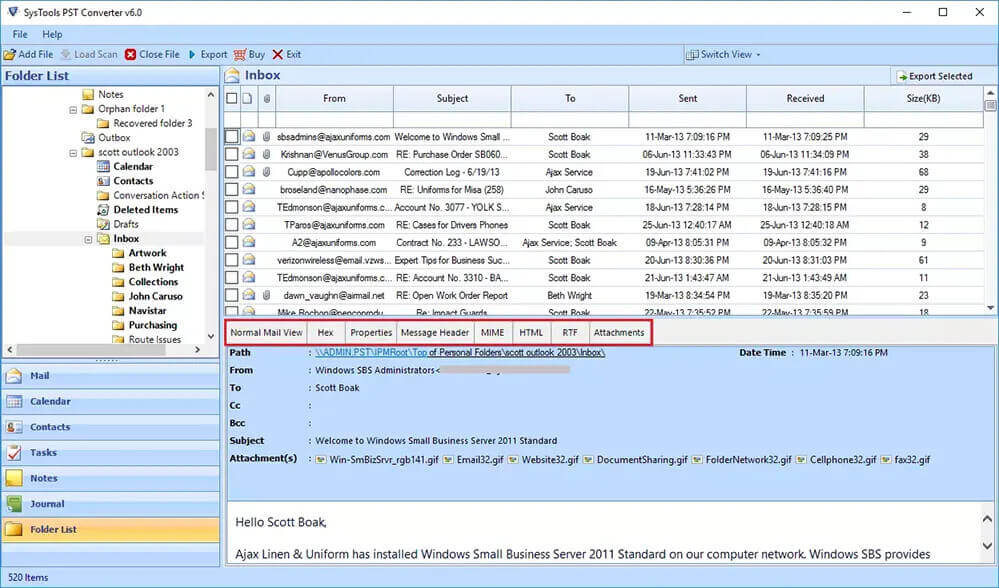
Step 5. Now , select CSV as a saving option from the drop-down.
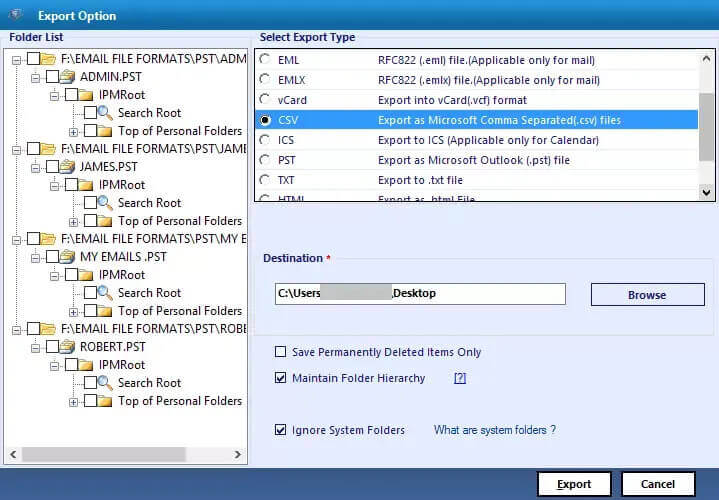
- Choose the required features:
- Remove Duplicate Mail:- To exclude the duplicate emails based on To, From, Bcc, Body, Subject.
- Save in Same Folder:
Check this to make the source and destination folder the same.
Забележка: After selecting this option, the Path To Save button gets disabled automatically. - Maintain Folder Hierarchy:- To preserve the original folder hierarchy.
- You can also migrate or backup emails without attachments files into a CSV file.
Step 6. Click the Path To Save button to select the saving folder of output files.
Step 7. Click on the Convert button to start the conversion of Outlook PST to CSV format.
Безплатно изтегляне Безплатно изтегляне
Why Choose PST Converter?
- Convert PST to MBOX , CSV, OST, CSV, EML, EMLX, DOC, DOCX, DOCM formats.
- Import PST files to Gmail, Thunderbird, AOL, IMAP, Office 365, Live Exchange, HostGator, iCloud Email, etc.
- Allows users to perform bulk conversion of PST files into CSV format.
- It offers an easy-to-use & intuitive interface.
- Поддръжка all the versions of Windows OS like 11, 10, 8.1, 8, 7, Vista, XP, etc.
- Provides a facility to preserve на original folder structure.
- Можете също така предварителен преглед the mail and their attachment files before conversion.
How to Convert PST to CSV with Outlook
Here is the manual method to export Outlook PST into CSV if Outlook is installed on your system. To-do-so, follow the below steps:
- Преди всичко, Отворете Outlook on your system.
- Кликнете върху the File tab and go to the Import and Export section.
- In this, избирам the Import/Export option.
- В Import/Export wizard, select Export a file and click on the Следващ бутон.
- Now, choose the Стойности, разделени със запетая from the list and hit the Next button.
- Here, choose the folders you want to convert and щракнете върху „Напред“.
- Опция for the желано местоположение to save the resultant CSV files.
- Накрая щракнете върху Бутон „Край“ to complete the process.
Заключение
Converting Outlook PST into CSV without Outlook is not an easy task. But using an Export suggested PST конвертор , you can convert PST to CSV without Outlook installation. In addition, we also read the complete solution to convert PST to CSV in case Outlook is installed on your computer. For more information, you can download the demo version of the software and evaluate the work and performance.
Безплатно изтегляне Безплатно изтегляне
Колко полезна беше тази публикация?
Кликнете върху звезда, за да го оцените!
Средна оценка / 5. Брой гласове:


![Как да конвертирате Gmail в Outlook [Не е трудно]](https://www.getappsolution.com/images/convert-gmail-to-outlook-390x220.jpeg)